Google's Personal Intelligence Now Rolling Out to Free Gemini Users in the U.S.

Google's Personal Intelligence Now Rolling Out to Free Gemini Users in the U.S.

Google is bringing Personal Intelligence to all Google Gemini users starting today, after testing the feature with its paid plans. Personal Intelligence allows Gemini AI to provide personalized responses based on information pulled from connected Google apps like Gmail, Google Photos , YouTube, and more. Personal Intelligence is expanding in the U.S. across AI Mode in Search, the Gemini app, and Gemini in Chrome. Gemini is able to draw on the information that it knows about you from your Google accounts, from emails you sent, items you purchased, and what you've searched for. Google says that it is designed to help you "find exactly what you need without having to give all the context." Google provides several examples of how Gemini's Personal Intelligence can be helpful: Custom shopping recommendations - Gemini can offer custom recommendations based on past purchases. If you want to find a bag to go with new shoes for example, Gemini can narrow the search to matching products. Tech help - Google says users can get troubleshooting help for a product like a refrigerator without knowing the model, because the information can be pulled from a purchase receipt. Making plans - When you're traveling and need to grab a bite to eat at an airport, Gemini can make suggestions based on the types of food that you like. You can also get recommendations on places to eat and visit when traveling based on your interests and past favorites. Users can choose to connect apps like Gmail and Google ‌Photos‌ to Gemini for personalization, or can opt out, and the feature is off by default. Google says that Gemini and AI Mode do not train directly on a Gmail inbox or ‌Photos‌ library, but prompts in Gemini and the model's responses can be used for training purposes. Personal Intelligence is already available in the U.S. for AI Mode in Search, and it is rolling out in the Gemini app and Gemini in Chrome for free users. Google says that connected experiences are designed for personal Google accounts and not for Workspace business, enterprise, or education users. Gemini's personalization features could compete directly with the Siri personalization that Apple plans to bring to Siri later this year , as connecting Gmail and other apps to Gemini mirrors some of the functionality that Apple is introducing for ‌Siri‌. ‌Siri‌ will be able to read emails, messages, files, photos, and more, learning information about the user to complete tasks and keep track of files. The new ‌Siri‌ features have been delayed several times, and at this point, we may not be getting the updated version of ‌Siri‌ until closer to the end of the year. Tags: Gemini , Google This article, " Google's Personal Intelligence Now Rolling Out to Free Gemini Users in the U.S. " first appeared on MacRumors.com Discuss this article in our forums

My ADHD brain can’t stop at night. These screen-time fixes help

My ADHD brain can’t stop at night. These screen-time fixes help

My late-night screen habits are… not great. I’ll admit it. Hyperfocus , if you’ve got attention deficit disorder like I do, is intense and relentless, almost like a separate entity taking hold of me. I’ll spend hours on an article, fiddling with every sentence until the words sing the way I want them to. Some people call it a superpower, but the reality is that it can be pretty brutal. One morning I woke up with a headache so bad that I had to call out sick from work. Cold towel on my face. Lights off. Silence. Ugh. But these free, installable tools I use on the regular? They work with my overactive mind rather than against it. Maybe they’ll help you too. Get up and stretch, you fool The first fix was setting up Break Timer , which is a Google Chrome extension that pokes you every so often, prompting you to take a break. I’ve configured mine to go off every hour. When it triggers, it takes over your screen with a full-window break prompt (you can change it to just a notification if you prefer). A gentle diddy will start playing as a timer appears in the middle of the screen, counting down your break. Weirdly, it works. I’ll get up, uncurl my bent-over body (I sit like a goblin creature at my desk), and either grab a snack from the kitchen or see what my greyhound’s up to. If you’re in the middle of something important though, you can just close the window with a single click. Same thing goes for totally closing the app: just a single click. After about a month of using the Break Timer extension, I noticed fewer headaches and less eye strain. Sitting frozen at a desk all day (or night) doesn’t make my work better. It just makes me sore and cranky, and that’s no good. These physical breaks helped me feel less sore in the morning, sure, but my brain was still spinning at night. Eventually I figured the blue light from my laptop screen wasn’t helping me in the slightest. Warmer screens at night The second fix was to cut down on the blue light blasting my eyeballs. It doesn’t seem harmful at first. It’s just a glowing screen in the dark. But it can really do a number on your circadian rhythm and melatonin production . When your brain thinks it’s noon, it’ll behave like it’s… well… noon. That’s why I changed the color temperature of my display. I use WarmView to change the color temperature. It’s another Google Chrome extension and it changes the color within the browser itself. I like that the interface is so simple and straightforward. It just makes everything warmer and easier to look at. Here’s how it works: You can pick from three different preset modes (Daylight, Sunset, Night) or you can adjust the warmth using a slider. Personally, I find Night mode to be distractingly orange (it’s too dark!), which is why I stick with Sunset mode–it’s a lighter and kinder on the eyes. The warmer screen doesn’t magically make me tired. It just makes things a bit less stimulating. Sometimes I’ve got to physically walk away from the screen and do something else, which is why I’ve implemented a shutdown ritual. The aforementioned shutdown ritual The hardest part when you’re in hyperfocus mode? Stopping. So when it’s time for me to close up shop at the end of the day, I need to physically vacate the space I’m in. And that’s where my tea making ritual comes in. I brew myself a cup of lavender (non-caffeinated!) tea almost every night, and this routine alone signals the day coming to an end. I’m not exactly sure what it is. Maybe it’s the warmth of the mug or the ritual of turning on the stove to heat up the kettle. Whatever it is, it’s grounding. On hard stops So, what happens when I struggle to turn hyperfocus off? In those situations, I find that I’ve got to remove the temptation entirely. That’s where a site blocker extension called FocusGuard comes in. This app lets you block off specific sites with one click. Just navigate to the website you want to block, open the extension, select the blue Block Current Site button, and… boom! It’s done. I use this extension to block access to social media and Google Docs, which is where I do most of my writing. It might sound extreme to block access to these websites but sometimes hyperfocus doesn’t want to cooperate with Break Timer’s polite suggestions. It sort of needs someone (or something ) to push it off of the cliff and that’s what this extension does. Making my environment smarter My hyperfocus probably won’t ever go away, nor would I want it to. It’s just who I am at this point. But that’s exactly why I’ve made my environment work with me and not against me – I know myself well enough to know what works and what doesn’t. That said, it’s not all roses. There are times where my brain just does what it wants. Sometimes I’ll ignore the reminders and everything else I’ve set up and keep working, even when I really do need a break. But most of the time? Those little tweaks are enough to bring me back down to earth.

Lenovo ThinkPad T1g review: A jack of all trades, but it works

Lenovo ThinkPad T1g review: A jack of all trades, but it works

At a glance Expert's Rating Pros Durable design Spacious keyboard layout IPS display is extremely bright and sharp Decent battery life for discrete graphics Cons Touchpad could be larger IPS display has limited contrast Power-starved RTX 5070 provides modest performance Our Verdict The Lenovo ThinkPad T1g doesn’t excel in any one area, but good-enough performance across the board, along with its durable design and large keyboard, make it a good choice for work and play. Price When Reviewed This value will show the geolocated pricing text for product undefined Best Pricing Today Best Prices Today: Lenovo ThinkPad T1g Retailer Price Check Price comparison from over 24,000 stores worldwide Product Price Price comparison from Backmarket A jack of all trades is a master of none, as the saying goes.  And if you tend to agree, then the Lenovo ThinkPad T1g might be a hard sale. It’s a business laptop that’s also a gaming laptop. A desktop replacement that’s also portable. A machine for both creative pros and Excel pros. Designing a laptop for so many cases stretches the T1g a bit thin, but it makes sense if you’re looking for one laptop that can handle both work and play. The ThinkPad T1g is best understood as a prosumer machine for people who need one laptop that can handle both demanding work applications, like video editing or 3D modeling software, and demanding entertainment like PC games. Lenovo ThinkPad T1g: Specs and features as-tested The Lenovo ThinkPad T1g I tested has an Intel Core Ultra 9 285H CPU and an Nvidia RTX 5070 GPU. That’s a classic combo for a mid-range gaming laptop or portable workstation. Lenovo also offers variants with Intel Core Ultra 7 and RTX 5060 graphics. CPU: Intel Core Ultra 9 285H Memory: 32GB LPDDR5x-7467 Graphics/GPU: Nvidia RTX 5070 8GB with 75-watt TGP NPU: Intel AI Boost Display: 16-inch 3840×2400 IPS 60Hz HDR Storage: 1TB M.2 PCIe 5.0 solid state drive Webcam and microphone: 5MP webcam with IR camera and privacy shutter Connectivity: 2x Thunderbolt 5 with DisplayPort 2.1 Alt Mode and 140 watts of Power Delivery (15 watts output), 1x Thunderbolt 4 with DisplayPort 2.1 and 140 watts of Power Delivery (15 watt output), 1x HDMI 2.1, 1x 3.5mm combo audio, 1x SD card reader Networking: Wi-Fi 7, Bluetooth 5.4 Biometrics: Windows Hello facial recognition, fingerprint reader Battery capacity: 90 watt-hours Dimensions: 13.95 x 9.49 x 0.62 inches Weight: 4.06 pounds Operating System: Windows 11 Pro Price: $2,489.99 current retail (similar configuration) With that said, the ThinkPad T1g configuration I received is probably the best value of the bunch. That’s because it pairs the RTX 5070 with a 4K IPS display and 32GB of memory. Lenovo also provides models with a tandem OLED display and up to 64GB of memory, both of which are nice upgrades. But choosing those options can increase the price by $1,000 or more. The specific model I reviewed, with Intel Core Ultra 9, IPS display and 32GB of memory, currently retails at $2,489 on Lenovo’s website. However, pricing is much different depending on the retailer—I saw prices up roughly $5,000. So, make sure you check multiple retailers if you go shopping for this machine. Lenovo ThinkPad T1g: Design and build quality Foundry / Matthew Smith At a glance, the Lenovo ThinkPad T1g looks like any ThinkPad sold in the last 10 years. That’s true of many ThinkPads, but even more so the T1g, as it’s a relatively large machine with a 16-inch display. While the specifications list the machine’s thickness at .62 inches, which is svelte, that number doesn’t include the laptop’s thick feet, which adds an extra tenth of an inch. There are some differences on close inspection, though. The lid isn’t the grippy magnesium alloy material of old but instead a smooth, sleek piece of aluminum. There’s also a camera bump, which doubles as a convenient way to open the lid when the laptop is closed. The laptop’s interior also differs from ThinkPads of old, though less so than the exterior. Signs of modernity are obvious across the touchpad and keyboard—more on that in a moment. However, the interior finish has a grippy, plastic-rubber feel that’s pleasant to touch and offers a nice sense of texture. But this is just a finish over an aluminum lower half, so the laptop is still extremely rigid. Picking the laptop up from a corner reveals no easily noticeable flex, though you’ll see it if you squint. The same is true of the display lid and, on the whole, the T1g comes across as a rugged and durable machine. Lenovo ThinkPad T1g: Keyboard, touchpad Foundry / Matthew Smith I’m a fan of the Lenovo ThinkPad T1g’s keyboard layout. It has a large, centered keyboard without a numpad. Skipping the numpad means there’s a lot of space for the remaining keys. The right side Alt, Copilot, and Control keys are truncated to make room for the arrow keys but, other than that (and the function row keys, which are always small on a laptop), most keys are nearly full-sized relative to a desktop keyboard. Key feel is less impressive, though still good. Old-school ThinkPad fans (like me) won’t be impressed by the tactile feel, which seems a tad shallow and wooden by historic standards. On the plus side, the keys have a crisp and definitive action, and I had no problem typing accurately at speed. The touchpad is so-so. It measures about 5.5 inches wide and 3.5 inches deep, which is a modest size for a premium 16-inch laptop. The Asus ProArt P16 is one of many competitors that offer more space. The touchpad has a pleasant glass surface, though, and includes haptics to provide a sense of tactile feel when you tap to click. No physical, clicky touchpad buttons are provided, but that’s true for virtually all laptops sold in 2026. And, yes, Lenovo’s classic TrackPoint nub remains. I must confess that I’ve found myself using the TrackPoint less and less over the years as touchpads have improved in quality and size, but it’s still a handy way to access the mouse without moving your hands from a standard typing position. Lenovo ThinkPad T1g: Display, audio Foundry / Matthew Smith Lenovo provides two display options for the ThinkPad T1g: a 3840×2400 IPS display and a 3200×2000 tandem OLED touchscreen. The T1g I reviewed came with the IPS display, which definitely isn’t as exciting as the Tandem OLED, but it has perks. First, the bad news. Like all displays of its ilk, the IPS display lacks contrast and looks a bit flat when displaying colorful, dynamic, and high-contrast content. It doesn’t jump out on first glance but compared to any OLED display—and a lot of laptops have an OLED display in 2026—it’s obvious. The IPS display also lacks color vibrance compared to OLED, though the difference there is less obvious and I think the IPS display’s color performance is good enough for most people. Now, the good news—this sucker is bright. That’s helpful if you plan to use the laptop in a space where you don’t have much control over the ambient light. The display also has a low-gloss finish, so the glare from bright lights will be minimized. I think the choice between IPS and tandem OLED is this: do you view the T1g as a portable workstation or a desktop replacement? The IPS display is better for portability, as the display is more readable and enjoyable in a wide variety of lighting scenarios. But the tandem OLED looks far better when using the laptop in a space where you have some control over the ambient light and can control any light sources that would cause glare. The IPS display is sharper, too. The tandem OLED is still sharp, but you won’t be able to view 4K content at its full resolution. Audio is provided by a pair of two-watt stereo speakers that support Dolby Atmos and Voice. While the specs don’t sound that impressive, the speakers’ audio quality is passable. They provide good volume and decent audio clarity. The issue is the lack of low-end, which makes the speakers seem hollow and thin when listening to music or watching a movie. Lenovo ThinkPad T1g: Webcam, microphone, biometrics A 5 megapixel webcam is packed into the Lenovo ThinkPad T1g’s camera hump and offers a resolution up to 2560×1440. It looks sharp for a webcam and handles low light situations better than most Windows laptops that come across my desk. The webcam also provides a physical privacy shutter. The dual-microphone array is typical of the breed. It picks up audio with good clarity and can cancel out repetitive background noises. The audio it records is suitable for Zoom and Google Meet but sounds hollow so, like most laptop mics, it’s not going to work for recording a podcast. Biometric login is provided through an IR camera (for facial recognition) and a fingerprint reader. Both worked well in my testing. Most competitive laptops also offer an IR camera and a fingerprint reader. The T1g also supports presence detection, which can turn off the display or put the laptop to sleep when it detects that you’re away, and then bring the laptop back to life when you return. Lenovo ThinkPad T1g: Connectivity The Lenovo ThinkPad T1g provides two Thunderbolt 5 ports and one Thunderbolt 4 port. The Thunderbolt 5 ports are on the left flank, while the Thunderbolt 4 port is on the right flank. All of these ports can also handle DisplayPort 2.1 and up to 140 watts or Power Delivery input (and 15 watts output). That makes the Thunderbolt ports extremely versatile. They can be used for high-speed data connections, for video connections, to charge the laptop—or all three at the same time. The included 140-watt power adapter can charge the laptop over any of these ports. It’s not unusual for portable workstations to include this many Thunderbolt ports, but the ThinkPad T1g has a few advantages. It includes DisplayPort 2.1, so it can handle very high resolutions and refresh rates. Also, the laptop is designed to operate with a 140 watt power adapter, so the Thunderbolt ports can fully power and charge the laptop. Many portable workstations require an additional power adapter. The Thunderbolt 5 ports are joined by a USB-A 3.2 port with 10Gbps of data, an SD Express 7.0 card reader, an HDMI 2.1-out, and a 3.5mm combo audio jack. That’s a good range of options, but the RJ45 (Ethernet) port is absent. You might not miss the Ethernet port, though, because every ThinkPad T1g ships with Wi-Fi 7 and Bluetooth 5.4—and, wow, the Wi-Fi on this thing screams. I saw Steam download speeds up to 860Mbps when inside my home and up to 67Mbps in my detached office several walls and 50 feet away from the nearest router. Lenovo ThinkPad T1g: Performance The Lenovo ThinkPad T1g is available in a variety of configurations, but the model I reviewed had an Intel Core Ultra 9 285H CPU and an RTX 5070 GPU. They were supported by 32GB of LPDDR5x-7467 RAM and a 1TB PCIe 5.0 solid state drive. Foundry / Matthew Smith PCMark 10, a holistic system benchmark, put the ThinkPad T1g off to a solid start. It achieved a score of 8,558, which is the second-best of similar systems PC World has recently tested. I expect the T1g’s combination of a fast CPU and GPU with speedy memory and a PCIe 5.0 drive helps it achieve good results. Foundry / Matthew Smith Cinebench 2024, a heavily multi-threaded benchmark, shows the T1g with Intel Core Ultra 9 285H can deliver strong but not surprising performance. The laptop’s score of 1,104 is generally in line with competitive laptops. Only the Razer Blade 16 leapt notably ahead. Foundry / Matthew Smith Flipping over to Handbrake, a heavily multi-threaded benchmark with a long duration, we see the T1g take pole position. It seems the T1g is able to keep the Intel Core Ultra 9 285H cranking out strong performance as this test proceeds, and that gives the T1g the win. Despite this, I didn’t find the T1g unusually loud. The fan noise was obvious, as is true of all laptops that run this test, but no more than is normal. Foundry / Matthew Smith Moving to graphics performance, the Nvidia RTX 5070 reached a 3DMark Time Spy score of 11,451 and a Port Royale score of 7,391. As the graph shows, these scores are not remarkable for an RTX 5070. The T1g comes in behind the Asus ProArt P16 with RTX 5070, and it’s not that much quicker than the Alienware 16 Aurora with RTX 5060. The T1g’s allotted thermal graphics power is to blame. The RTX 5070 has a maximum TGP of 75 watts, which isn’t a lot for an RTX 5070. The Asus ProArt P16, by contrast, has a maximum TGP of 115 watts. The trade-off here is that the T1g only requires a 140-watt power adapter, while the ProArt P16 requires a 200-watt power adapter. Foundry / Matthew Smith Predictably, the lower TGP leads to lower performance in games, too. Shadow of the Tomb Raider averaged 130 frames per second at 1080p and Highest detail. That’s not bad at all, but it’s towards the low end for RTX 5070 mobile graphics. Foundry / Matthew Smith Things look even worse in Metro Exodus , where the T1g averaged only 44 frames per second at 1080p and Extreme detail. That’s only a frame better than the Alienware 16 Aurora with Nvidia RTX 5060. Foundry / Matthew Smith The story remains largely the same in Cyberpunk 2077 . Here the T1g is able to pull noticeably ahead of the Alienware 16 Aurora, but remains quite a bit behind the Asus ProArt P16. And the Razer Blade 16 with RTX 5090 is much faster still, of course. This leaves the performance section of the review on somewhat of a sour note, which I think is unfair. The key thing to remember is this—the T1g weighs about 4 pounds, is under seven-tenths of an inch thick, and has a 140-watt power adapter. These traits are a trade-off. The T1g is not the best pick if you want maximum performance, but it’s light and portable for a 16-inch machine with discrete graphics. Lenovo ThinkPad T1g: Battery life and portability Lenovo’s ThinkPad T1g ships with a 90 watt-hour battery. That’s actually a little smaller than I might expect, as it’s not uncommon for workstation laptops to ship with a 99 watt-hour battery. Still, the ThinkPad T1g’s endurance is good for a laptop with a beefy CPU and discrete graphics. Foundry / Matthew Smith I saw over 11 hours of battery life in PC World’s standard battery test, which loops a 4K file of the short film Tears of Steel . As the graph shows, it’s a good result for a powerful laptop. Real-world battery life can vary significantly depending on how the laptop is used. Ramping the display brightness all the way up while you work on a complex Blender project could suck down the battery in a couple of hours. But in my use, which included a lot of web browsing and writing in LibreOffice, eight hours of use (or more) were doable. The laptop supports rapid charging and Lenovo claims it can achieve 80 percent of maximum in one hour. While PC World doesn’t have a standardized test for this, my usage indicated that number is near the mark. Remember, too, that the laptop can be charged via any of its Thunderbolt ports. That provides a lot of options for charging the laptop, and while 140 watts is required to fully power the laptop and charge it quickly, a more common 65 to 100-watt power source will also charge the laptop in a few hours. Lenovo ThinkPad T1g: Conclusion Don’t let the Lenovo ThinkPad T1g’s branding fool you. This is not a business laptop, and while it works as a portable workstation, it’s not that either. The ThinkPad T1g is best understood as a prosumer machine for people who need one laptop that can handle both demanding work applications, like video editing or 3D modeling software, and demanding entertainment like PC games. The T1g’s only real downside is not a trait of the laptop itself. It’s the competition. Asus’ ProArt P16 gets my nod over the T1g, as it can be had with similar hardware at a similar price and offers better overall GPU performance. The Dell XPS 16, Alienware Aurora 16, and Razer Blade 16 are also competitive on value. So, why choose the ThinkPad T1g? The laptop’s fast connectivity (both wired and wireless), spacious keyboard, and durable design might all tip shoppers in the ThinkPad’s direction. While I think the Asus ProArt P16 is the way to go for most Windows prosumers, the T1g is a good choice if you want a machine that feels more durable and buttoned-down.

Apple Opens Developer Accounts on bilibili and LinkedIn Before WWDC 2026

Apple Opens Developer Accounts on bilibili and LinkedIn Before WWDC 2026

As Apple gears up to connect with developers at the 2026 Worldwide Developers Conference in June, it has created new Apple Developer accounts on two new social networks. Apple Developer can be found on bilibili in China and LinkedIn . Apple says that its developer accounts will provide the latest news, announcements, videos, and events for the Worldwide Developers Conference, as well as any upcoming Meet with Apple activities. Bilibili is a popular Chinese video-sharing platform that's similar to YouTube, so Apple will be sharing video on the site. LinkedIn is a global site that is aimed at professional networking. Apple this month also introduced a new Hello Apple Instagram account , which the company will use to share news, stories, product marketing, and more to highlight how Apple products inspire creativity to help make a difference in everyday lives. Related Forum: Apple, Inc and Tech Industry This article, " Apple Opens Developer Accounts on bilibili and LinkedIn Before WWDC 2026 " first appeared on MacRumors.com Discuss this article in our forums

Airflow enthusiast 3D-prints 15 tiny fans to fit inside a custom, domed Noctua NF-A12x25 frame — bizarre 'Fanhattan Project' cools the CPU just as well as a regular fan

Airflow enthusiast 3D-prints 15 tiny fans to fit inside a custom, domed Noctua NF-A12x25 frame — bizarre 'Fanhattan Project' cools the CPU just as well as a regular fan

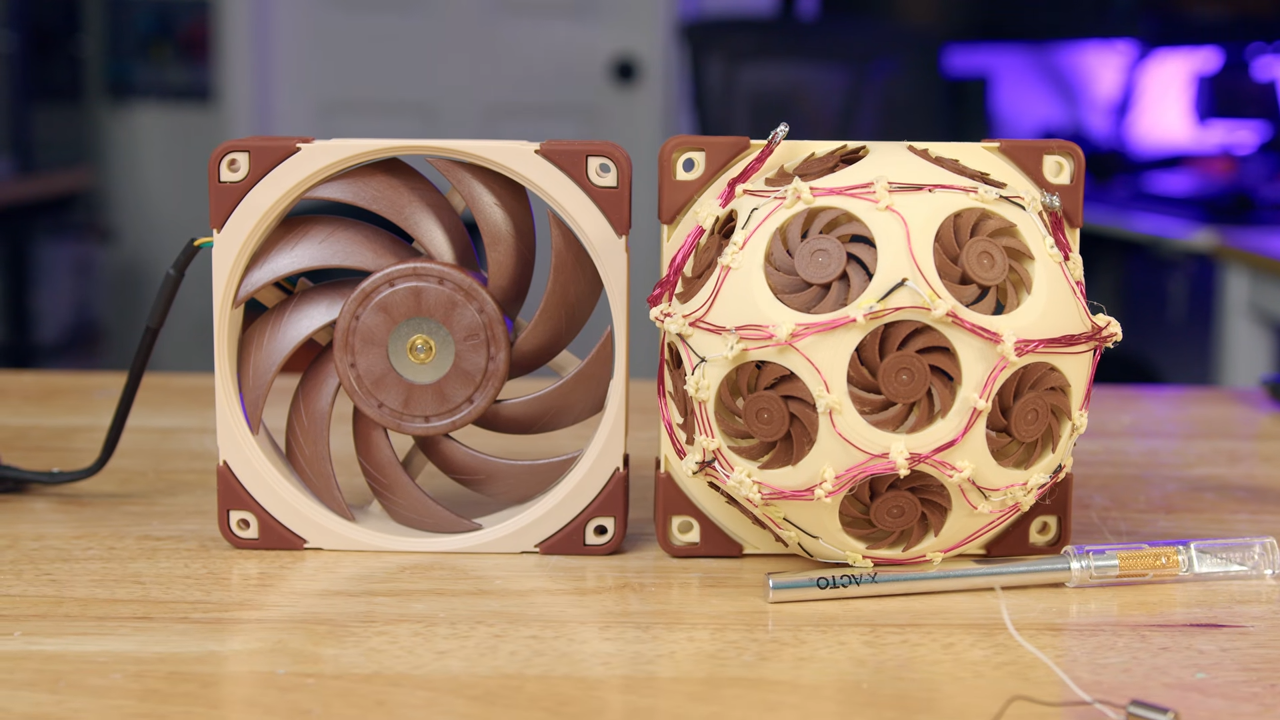
Have you ever wanted to use a fan that's more than three times as loud as the other option while providing the same performance? If you answered in resounding joy, then this project is exactly what you've been looking for. A YouTuber 3D-printed a fan that's actually made up of 15 tiny fans, fit inside the frame of a regular 120mm fan modelled after the Noctua NF-A12x25.

SK Group Chair Chey Tae-won says memory chip makers are expanding capacity but are unlikely to match demand until around 2030; basic wafer supply lags by 20%+ (Yoolim Lee/Bloomberg)

SK Group Chair Chey Tae-won says memory chip makers are expanding capacity but are unlikely to match demand until around 2030; basic wafer supply lags by 20%+ (Yoolim Lee/Bloomberg)

Yoolim Lee / Bloomberg : SK Group Chair Chey Tae-won says memory chip makers are expanding capacity but are unlikely to match demand until around 2030; basic wafer supply lags by 20%+ —  A global shortage of memory chips is likely to persist another four to five years because of endemic constraints in semiconductor production …

Global chip supply chain under threat as US-Iran conflict enters third week — Strait of Hormuz blockade is days away from crippling Taiwan's semiconductor industry

Global chip supply chain under threat as US-Iran conflict enters third week — Strait of Hormuz blockade is days away from crippling Taiwan's semiconductor industry

Taiwan imports almost all of its energy and requires large amounts of LNG to sustain its electrical grid. That grid is then used by local chipmakers — like TSMC who is responsible for making most of the world's high-end chips. Fabrication for these chips requires helium, which Taiwan also imports and right now, the Iran-U.S. conflict has made it difficult to acquire both.

HomeKit Weekly: Aqara releases its first Matter camera alongside a new Apple Home enabled wired doorbell

HomeKit Weekly: Aqara releases its first Matter camera alongside a new Apple Home enabled wired doorbell

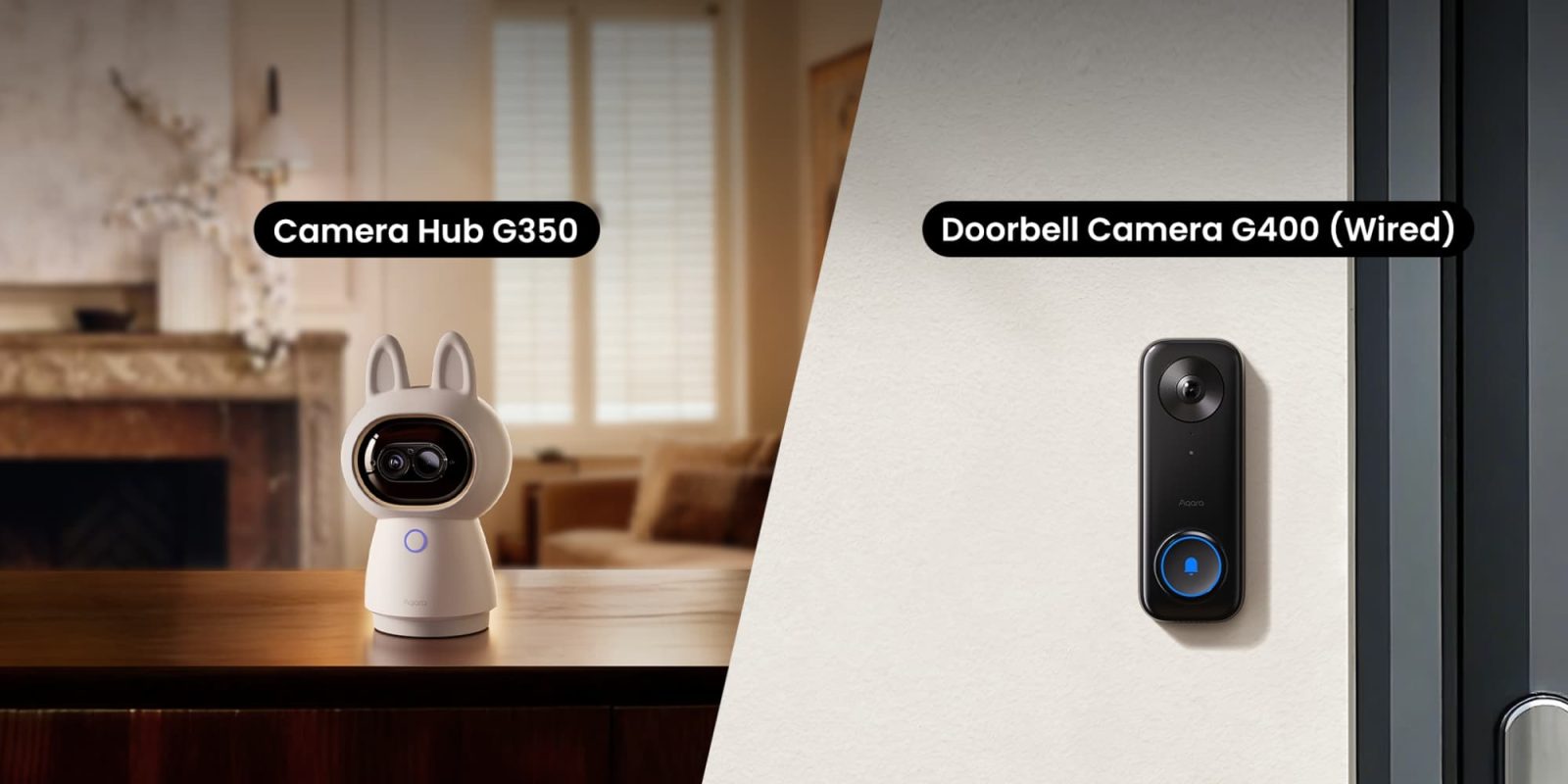
Aqara just announced two major additions to its smart home security lineup today. They have released the Camera Hub G350, which is the company’s first Matter-certified camera, along with the Doorbell Camera G400. I always look forward to seeing what Aqara does next, as they have been a great way to build out a low-cost smart home for years. These two devices bring so many needed features to the Apple Home ecosystem. more…